 by
by Product Background
While working at Cambridge Semantics, I was the Lead UX/UI Designer for their new product, Anzo Smart Data Lake (Anzo). Anzo is an enterprise data management platform that allows users to ingest, organize, discover, and analyze disparate datasets in order to form meaningful insights. Previously, Cambridge Semantics had multiple software applications primarily developed for administrative IT staff. Anzo Smart Data Lake was intended as a single unifying product with a focus on business users.
Problem Statement
I was tasked with designing how a user would manage foreign keys that were either made by Anzo users or brought in from a database. A foreign key defines the relationship between data and data models. For our users, foreign keys were important to allow them to link multiple datasets together. A foreign key is not a concept that we created at Cambridge Semantics, but is a very well established technical concept throughout the database world that cannot be altered. Therefore, my challenge was to support the complexity of what a foreign key can do within the bounds of a simple interface.
User Research
Going into this design I needed to understand three main concepts: what a foreign key was for my own domain knowledge, what users did with foreign keys once they made them, and what information users need to create a foreign key.
I interviewed internal users to answer the following questions:
- Do you need the ability to create a foreign key in Anzo and why?
- Without the ability to make foreign keys in Anzo, how do you create relationships between the data? Where does this process fit into your current workflow?
- When you created foreign keys in older versions of the product, where did this process fit in your workflow? What challenges occurred in your previous process? What did you like about the previous process?
- What information do you need to create a foreign key?
General learnings:
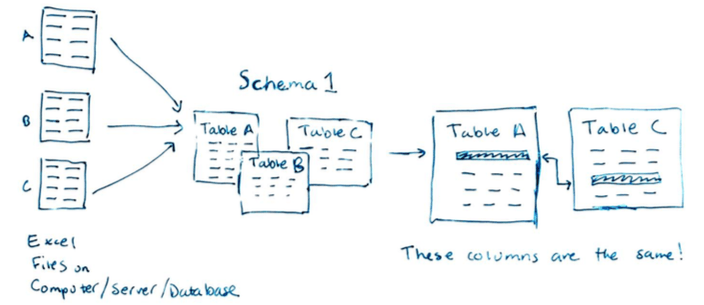
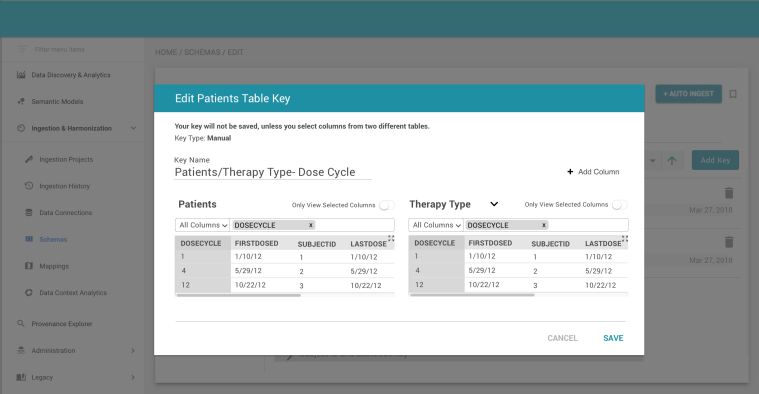
In Anzo, a user identifies files (commonly Excel files) filled with data that they want to bring into Anzo. These files are then automatically generated into a schema, which is an artifact that shows the structure of the data: column names, column datatypes, etc. A schema is made up of tables. For every file selected by the user, a table is generated in the schema. An important piece of information that I learned from the interviews is: when a user creates a foreign key, the user is identifying two columns from two different tables in a schema that contain the same data. For example, subID from the patient table is the same subID in the treatments table. Therefore, the data in the treatments table is also about the subjectA in the patient table.
Requirements

Design #1
From the interviews, this was the ideal workflow that I learned from the user:
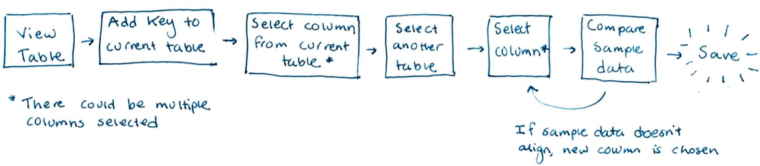
My goals for this first design was to take the above workflow and make this process as streamlined as possible from the starting point of looking at a particular table in a schema. I chose this as the starting point based on the feedback from the users that they add a foreign key to a table once they are already working with it.
Usability Testing
After creating an initial set of designs and a prototype, I conducted a usability test where internal users were asked to create a foreign key. After this usability test, I received the following feedback that users wanted to:
- View more sample data than in the current design.
- View sample data only for the columns he has selected.
- Show the primary keys in a table (more on this below).
- Know which foreign key came from a database and which has been manually created (more on this below).
Design #2
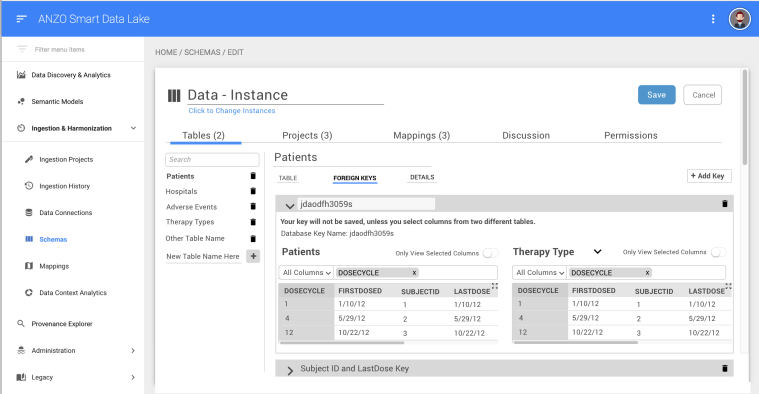
The two pieces of feedback that I focused on in the second iteration were including primary key and database key information. A primary key is a column in a table with unique values, but more specifically, these values uniquely identify each record of data. Identification numbers such as Patient IDs or Social Security numbers are common examples of unique values that might be be used as primary keys. Primary keys are frequently chosen to use for foreign keys, so I added the ability to filter by primary key and show a primary key icon next to the names of the columns.
A database key is a foreign key that was defined in a database. When a user brings in data from a database, it is important to show the database keys that have been previously defined. However, most of the time, a user will not want to make any edits to or delete a database key because it has already been validated before coming into Anzo. Therefore, to indicate a difference between a database key and a manual key, I included either text saying the name of the key defined in the database or text saying that the key was created manually. Lastly, if a user tried to make changes to a database key, they would receive a warning from Anzo informing them of the implications of such a change.
Final Design
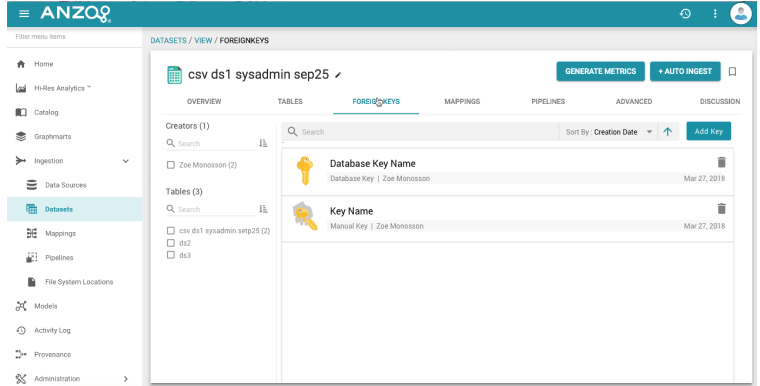
For the last iteration of the foreign keys design, I changed our editing pattern. In order to decrease the visual clutter, the user both creates and edits foreign keys in a dialog. As well, I adapted the foreign keys pattern to our new design standards because it made the UI more consistent and created a greater visual difference between the database and manual keys.

 Zoe Monosson